

It’s a question I hear from almost every customer who has migrated to Exchange Online: “We’re fully in the cloud now — when can we finally shut down the last hybrid Exchange server?” Nine times out of ten, the honest answer comes down to one missing piece: a proper SMTP relay for Exchange Online that legacy devices can actually use.
For years, my answer was the same, and it wasn’t the one they wanted to hear: not yet. Microsoft’s support statement was unambiguous — a hybrid Exchange server stays mandatory for two reasons, even after every mailbox has moved to Exchange Online:
- Recipient attribute management. Exchange-specific AD attributes (proxy addresses, mailbox visibility, and the like) on synced objects could only be edited through the on-premises Exchange Management Console/Shell. Editing them directly in Exchange Online was blocked by design, because on-prem AD remained the source of authority.
- SMTP relay for legacy senders. Scanners, line-of-business apps, monitoring systems, old ERP modules — anything that can only “speak” plain SMTP and can’t do modern authentication needed something to hand mail off to.
Half of that problem has now genuinely been solved by Microsoft. Half of it hasn’t. GraphMailer.NET exists to close the gap that’s left.
Half the Problem: Solved
The fix for reason #1 is a mailbox property called IsExchangeCloudManaged, introduced under the name Cloud-Managed Remote Mailboxes and generally available since. In a normal hybrid setup, Exchange-specific attributes on directory-synced mailboxes — proxy addresses, GAL visibility, extensionAttribute1–15, and similar — are locked in Exchange Online by design, because on-prem AD is the source of authority for them. That’s the whole reason the last Exchange server used to be unavoidable: any change to those fields had to go through Set-RemoteMailbox on-prem and sync up.
Flip the switch, and that changes:
Connect-ExchangeOnline
Set-Mailbox -Identity user@contoso.com -IsExchangeCloudManaged $true
From that point on, the Exchange-side attributes for that mailbox are editable directly in Exchange Online PowerShell, the Exchange Admin Center, or the Microsoft 365 admin center — no on-prem Exchange console required. Identity attributes (display name, department, manager, UPN, and so on) stay right where they were, authored on-prem in AD; only the Exchange-specific side of the object moves. It’s reversible per mailbox by setting the flag back to $false, and there’s an organization-level setting too, so every newly synced mailbox can be cloud-managed by default instead of needing an opt-in each time.
For most of my customers, that’s the actual finish line for reason #1. The on-prem Exchange server is no longer needed just to keep Exchange attributes editable.
As a short outlook: Microsoft also shipped attribute writeback into public preview in May 2026 — changes made in Exchange Online for cloud-managed mailboxes can now flow back down to on-prem AD automatically via Entra Cloud Sync, so legacy on-prem apps reading from AD stay in sync too. It’s a nice-to-have on top, not the thing that unlocks attribute management in the first place.
That leaves reason #2 standing alone: who relays the mail from the scanner in the copy room?
The Missing SMTP Relay for Exchange Online
This used to be a non-issue. Firewalls handled SMTP relay as a bolt-on feature, and Basic Auth/SMTP AUTH against Exchange Online just worked. Both of those are quietly going away — Microsoft has been shutting down Basic Auth across the board, and SMTP relay support in firewall appliances feels increasingly like a legacy checkbox nobody maintains anymore. What’s left is a real gap: there’s no free, actively maintained tool that accepts plain SMTP from legacy devices and hands it off to Exchange Online using modern, app-only authentication.
So I built one.
Attempt One: Node.js, Wrapped, and a Little Bit Wrong
My first version was a Node.js application, packaged into an executable and kept alive as a Windows service via NSSM. It did the job — it’s been running in production at a test customer’s site for several months now, relaying real mail from real legacy devices without incident.
But it never felt like it fit. NSSM works, but it’s a workaround, not a real Windows service. Config lived in a web-based interface, which meant yet another local web server just to change a setting. And every layer — Node.js runtime, the exe wrapper, NSSM babysitting the process — was one more thing that could break in an environment I was building specifically for Microsoft shops. A tool meant to plug a gap in a Windows/M365 environment probably shouldn’t itself be the odd one out on the server.
Attempt Two: Actually Native
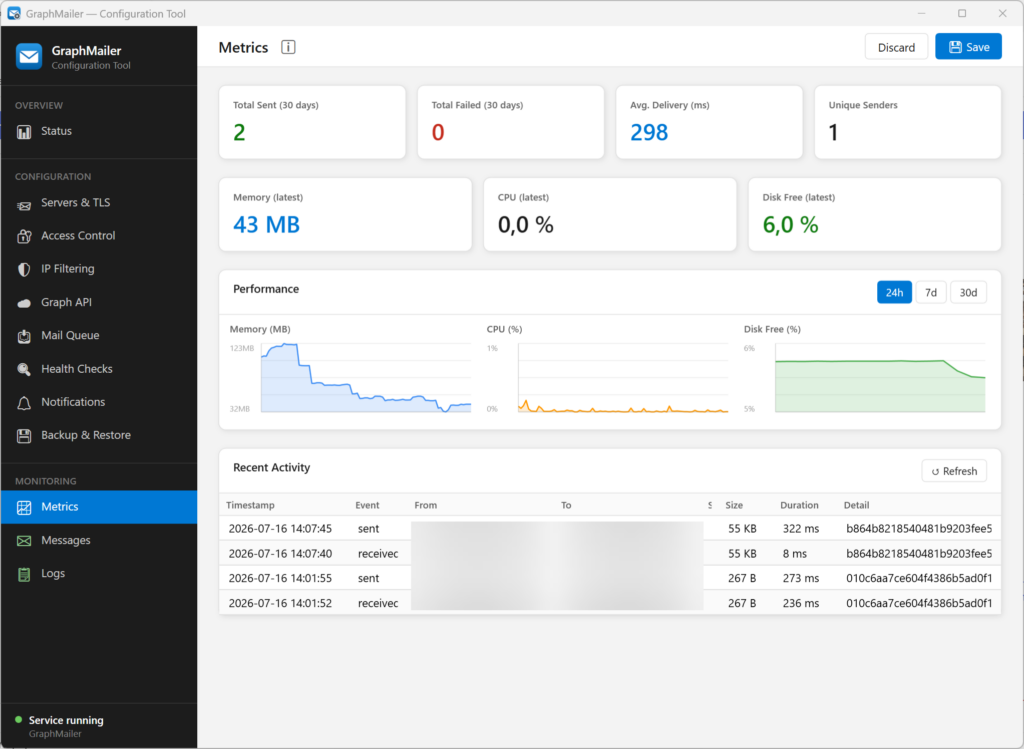
So I rewrote it. With Claude Code doing a lot of the heavy lifting on the C#/.NET side, GraphMailer.NET became what it probably should have been from the start: a genuine Windows service, installed via MSI, with a WPF ConfigTool replacing the old web UI entirely.
What it does now:
- Runs as a proper Windows service — no wrapper, no babysitting process, survives reboots cleanly.
- Standard SMTP listeners on 25, 465 (implicit TLS), and 587 (STARTTLS), with certificates pulled straight from the Windows certificate store.
- Access control — SMTP auth with per-user sender restrictions, IP allow/deny lists, and automatic blocking of brute-force clients.
- A persistent disk queue with an Exchange-aligned retry schedule, so an internet blip or a Graph outage never costs you mail. Permanently rejected messages generate an NDR instead of silently vanishing.
- Large attachments handled automatically through Graph upload sessions.
- A guided Entra ID setup wizard in the ConfigTool that registers the app and grants the right Graph permissions (
Mail.Send,Mail.ReadWrite,User.Read.All) for you — no manual App Registration clicking required. - Operations reports by email (daily/weekly/monthly), plus alerts for failures, certificate expiry, and disk space.
- Secrets encrypted at rest via Windows DPAPI — nothing sensitive sits around in plaintext config files.
The test customer’s setup has since been migrated over to this version, and it’s running the same production workload the Node.js build was handling — just without the parts that used to make me wince a little every time I opened that server’s Task Scheduler.
Where It Stands
GraphMailer.NET just hit its first tagged release (v1.2.0.196) and is up on GitHub, MIT-licensed, with an MSI installer that bundles the .NET 8 runtime bootstrapper so there’s nothing extra to chase down beforehand:
👉 github.com/debold/GraphMailer.NET
If you’re sitting on the same question I keep getting asked — “can we finally turn off the last hybrid server?” — IsExchangeCloudManaged closes one half of that door. If you’re still missing a working SMTP relay for Exchange Online to close the other half, GraphMailer.NET might be worth a look.
I’ll keep documenting the rough edges as they show up. If you try it and hit one, I’d genuinely like to hear about it.
